Social Media Marketing Tools: My Real Experience Using Them as a Marketer

Social media marketing tools are often promoted as ways to boost productivity, hack growth, and save time. After using them daily to manage brand pages, campaigns, and content calendars, I’ve realised that while these tools can simplify tasks, they also have limitations that are often overlooked.

Here’s my honest experience with the most common social media marketing tools: the good, the bad, and the lessons learned.
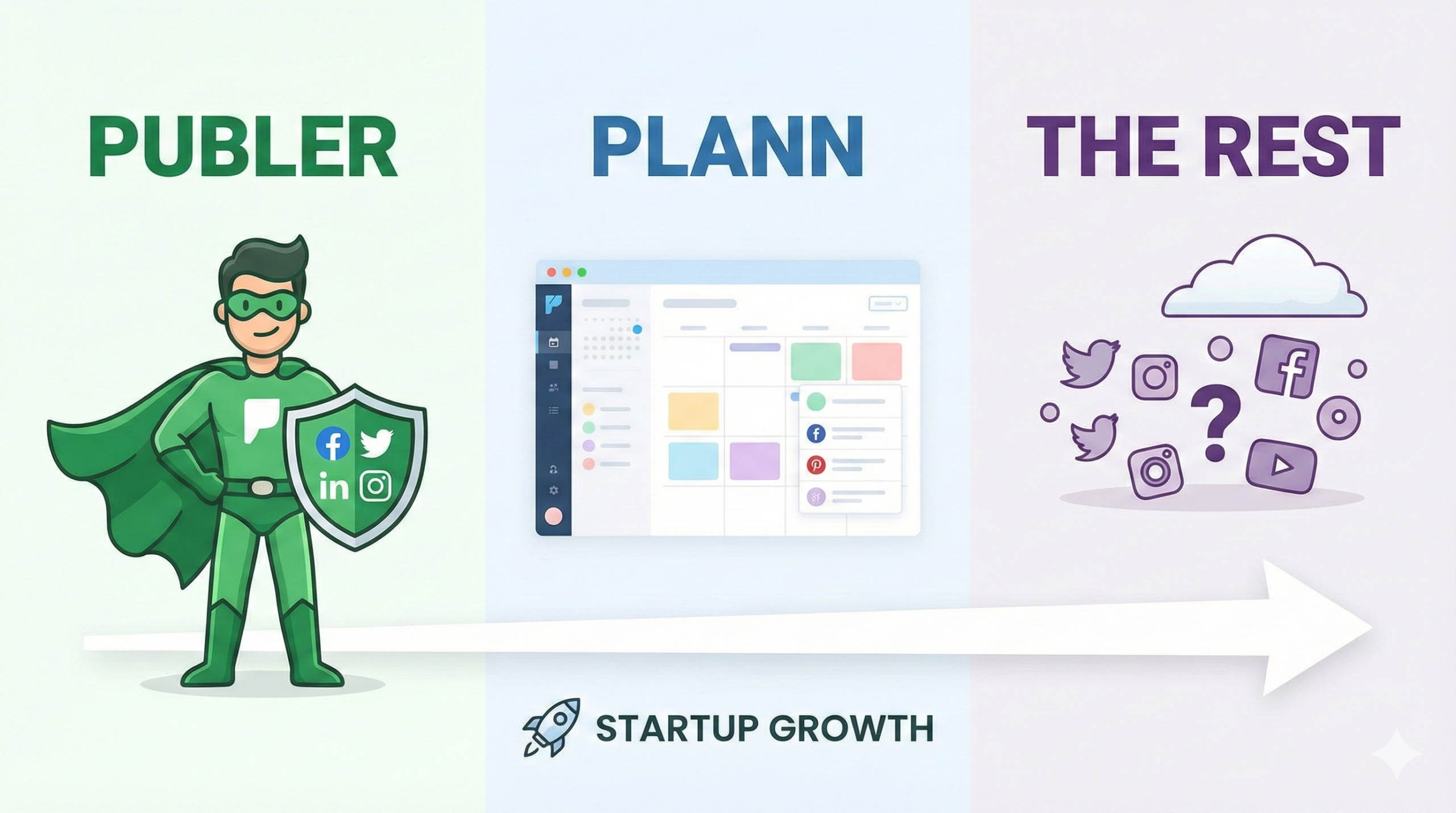
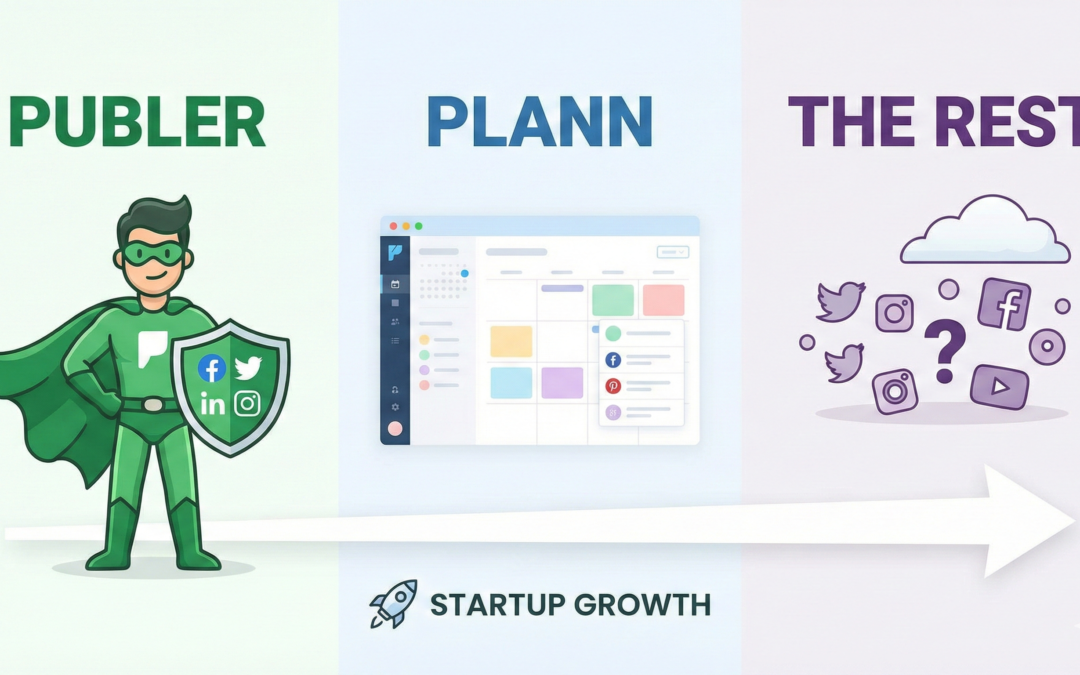
 Publer VS Plann VS the rest social media management tools for your startup

A. Content Creation Tools: Fast, Flexible, but Easy to Overdo

Tools like Canva and Adobe Express quickly became my daily go-tos. I appreciated how quickly I could create posts, stories, and ads in minutes rather than hours. The templates are a lifesaver when deadlines are tight, and the paid features help keep brand consistency with saved colours, fonts, and logos.

However, these tools can lead to a creative pitfall. Too many templates can make content repetitive, and it’s easy to overdo the designs. Early on, I focused more on looks than messaging, which hurt engagement. The tool worked great, but my approach didn’t.

Benefits:

– Fast design

– Beginner-friendly

– Great for brand consistency

Troubles:

– Risk of generic-looking content

– Creative overuse


B. Scheduling & Management Tools: Massive Time-Savers with a Catch

Using tools like Buffer, Hootsuite, Later, and Sprout Social completely transformed how I managed content. Scheduling posts in advance helped me stay consistent, reduced daily stress, and allowed me to focus on strategy rather than constant reminders.

What I didn’t like was the false sense of security. I once scheduled posts weeks in advance and forgot to monitor real-time events, resulting in poorly timed content during a sensitive period. Another issue was platform limitations; some features, like trending audio or story stickers, still need manual posting.

Benefits:

– Consistency

– Better planning

– Centralised dashboards

Troubles:

– Context blindness

– Limited platform-native features


C. Analytics Tools: Eye-Opening but Sometimes Overwhelming

Analytics tools such as Instagram Insights, Sprout Social, and Google Analytics revealed how audiences behave, often in ways that differed from my assumptions. I liked how clearly they showed what content worked and which platforms delivered results.

The downside? Data overload. I tried to track everything and ended up understanding nothing. Another mistake was focusing on vanity metrics like likes instead of meaningful actions like saves, clicks, or conversions. Analytics tools are powerful, but only when you know which numbers are important.

Benefits:

– Clear performance tracking

– Data-backed decisions

Troubles:

– Too much data

– Risk of misinterpreting metrics


D. Paid Advertising Tools: Powerful, Precise, and Unforgiving

Using Meta Ads Manager and LinkedIn Ads was both exciting and nerve-wracking. I loved the targeting options, A/B testing, and budget control. These tools are great for expanding reach and generating leads.

What I didn’t like was how quickly mistakes could become costly. Poor targeting, weak creatives, or missing tracking setups led to wasted money. Paid tools don’t allow for experimentation without consequences—you pay to learn.

Benefits:

– High reach

– Precise targeting

– Measurable results

Troubles:

– Steep learning curve

– Budget loss if misused


E. Social Listening Tools: Useful but Often Underused

Tools like Brand24 and Mention helped me grasp conversations beyond my feed. I valued how they highlighted brand mentions and sentiment in real time.

The challenge? They require regular attention. Without active monitoring, insights might go unused. Additionally, for smaller brands, the cost may not always seem justified.

Benefits:

– Reputation tracking

– Customer insight

Troubles:

– Time-consuming

– Cost vs value concerns


Final Thoughts 

As a social media marketer, I’ve learned that tools don’t make successful decisions; it’s the decisions themselves that matter. Free tools are surprisingly effective, paid tools offer value when used intentionally, and experience fills in gaps that no tool can. The key is balance: use tools to support strategy, not replace thought.
 

How WhatsApp Communities Are Managed?

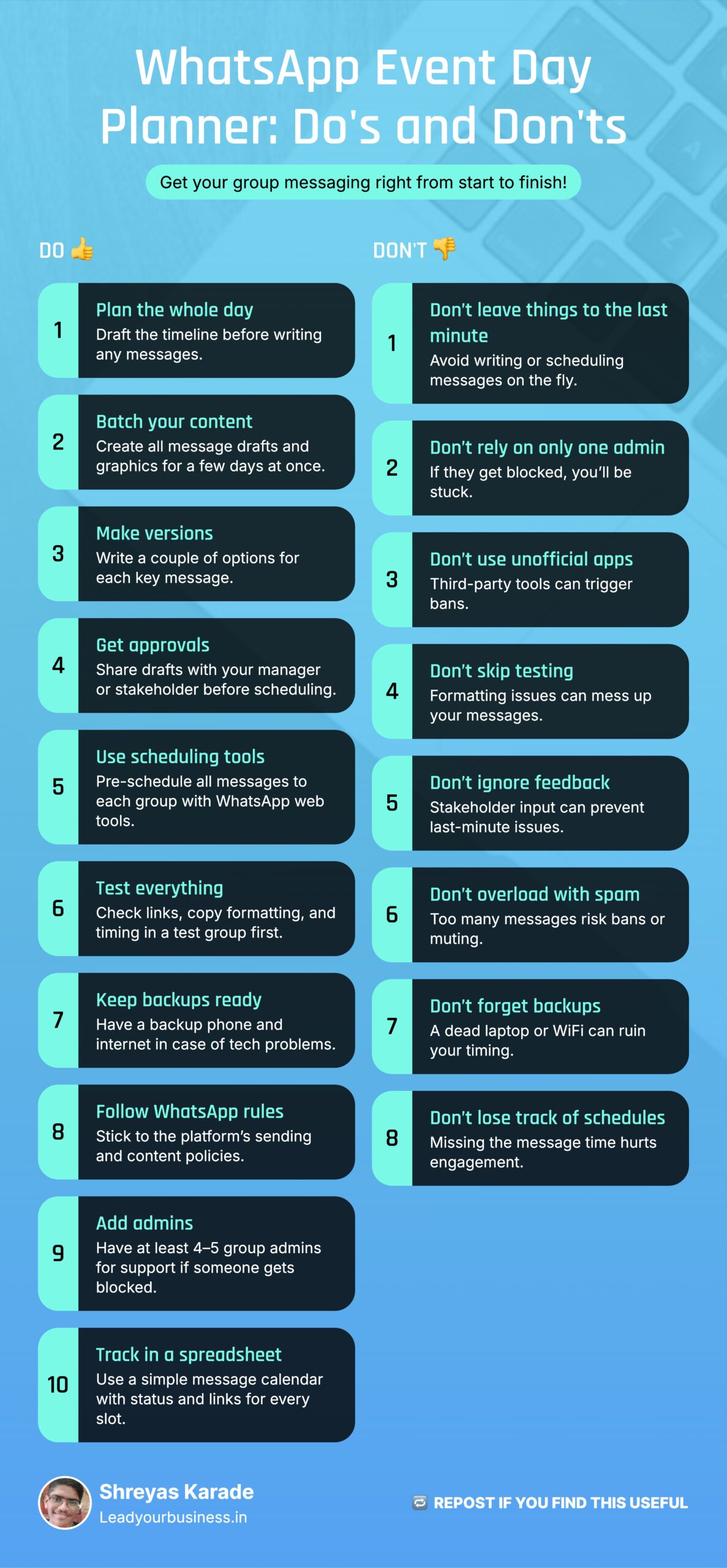
Multiple WhatsApp communities for webinars can be managed smoothly when you treat them like a product launch: plan every touchpoint, pre-create content, and use scheduling tools to execute at scale. This article helps you structure your WhatsApp messaging schedule for any event (workshop, masterclass, mastermind). So stay till the end – you’ll get many resources throughout the blog.

WhatsApp community plan

Context and scale

For a recent AI-focused weekend workshop at IIDE, six WhatsApp communities were run in parallel with over 5,000 participants, all driven by a detailed message schedule mapped to the event agenda. The goal was to maximize live attendance by using reminders, nudges, and engagement prompts at specific times, rather than sending messages ad hoc.

Step 1: Designing the daily agenda

Before any copy is written, the full communication plan for each event day is drafted: what happens in the morning, pre-session, during the session, and post-session. This includes message types such as reminders, polls, FAQs, link drops, and feedback prompts, all aligned with the event flow and learning outcomes. The plan is shared with the program or marketing manager, who suggests edits to timing, tonality, and call-to-actions until there is a final “hour-by-hour” roadmap for the groups.

Step 2: Creating content in batches

Once the agenda is frozen, all content pieces for at least the next three days are drafted in a single pass so that execution never depends on last-minute writing. For each important message (e.g., a key reminder or poll), two to three variations are created so the team can select the version with the clearest copy and strongest hook. Visual creatives—session banners, countdown posts, or simple text-based graphics—are designed alongside the copy so every scheduled slot has both text and creative ready to go.

Step 3: Approval workflow with stakeholders

After drafting, all messages and creatives are collated (often in a sheet or document) and sent to the manager or core stakeholder for review. The reviewer checks for brand alignment, tone, accuracy of links and timings, and suggests minor edits or replacement of certain prompts based on their understanding of the target audience. Final approved messages are then locked in a “ready to schedule” section so the execution team does not have to re-open strategy questions during the live days.

Step 4: Scheduling messages across groups

Running six groups manually is error-prone, so a scheduling layer is essential to ensure that reminders and engagement prompts go out on time in all communities. A WhatsApp Web scheduling extension such as Blueticks allows teams to pre-schedule messages to multiple groups, set specific send times, and even create recurring reminders, which dramatically reduces the chance of missed or delayed communication. While some plans require the laptop to stay online, newer versions and paid tiers support sending even when the computer is off, which is helpful for early-morning or late-night reminders.

Ready to Download Spreadsheet with Pre-Made Messages:

Click here to download


Step 5: Handling reliability and technical issues

During early runs, common issues included unstable internet connections, formatting errors when copying from documents, and short-term WhatsApp restrictions linked to high-volume activity. To mitigate this, teams often keep backup internet options (like mobile hotspots), test formatting in a small internal group before scheduling, and gradually ramp up message volume to reduce the risk of being flagged as spam. Over time, some teams even started building internal tools or extensions on top of WhatsApp Web to manage custom replies, standard responses for FAQs, and more robust scheduling logic tailored to their event workflows.

Step 6: If a WhatsApp account gets temporarily blocked

WhatsApp can temporarily ban numbers if it detects suspicious or automated behaviour, especially when using unsupported third-party tools or sending high-frequency bulk messages. In such cases, the platform usually shows a countdown timer, after which access is restored automatically, though reviews or appeals can sometimes take up to 24 hours or more, depending on the situation. For business use, avoid unofficial apps, follow WhatsApp’s commerce and anti-spam policies, and, if needed, submit a review request via in-app support or Meta Business Support channels.

Step 7: Role of Meta-verified WhatsApp and multiple admins

Using a verified WhatsApp Business account (Meta Verified) can improve trust, message deliverability, and access to priority support when issues such as bans or delivery problems arise. It is also smart to maintain at least four to five admins across the different groups so that if one admin faces a temporary restriction, others can step in with the same scheduling tools and templates without disrupting the communication plan.

Step 8: Using templates and spreadsheets

Behind the scenes, a structured spreadsheet for each event weekend acts as the single source of truth, with columns for date, time, group name, message type, final copy, creative link, and scheduling status. This “message calendar” is especially useful when multiple community managers are involved, as it lets anyone see what is already scheduled, pending, and requiring manual intervention. You can offer this Excel template as a downloadable resource on your blog, so readers can adapt it to their own WhatsApp communities for webinars, bootcamps, or cohort-based courses.

Publer vs. Plann vs. The Rest: Which Social Media Scheduler is Right for Your Startup?

Publer vs. Plann vs. The Rest: Which Social Media Scheduler is Right for Your Startup?


Choosing the right social media scheduling tool is a critical decision for any startup looking to scale its online presence efficiently. The market is saturated with options, each promising to save you time and boost engagement. We’re diving deep into two prominent contenders—Publer and Plann – and comparing them against the features of a typical, reliable platform to help your social media team make an informed choice.
The goal is simple: find the platform that offers the best blend of features, ease of use, and value for a fast-moving startup environment.

The Contenders: Publer, Plann, and the Generalist

Publer.com (formerly Publer.io) is positioned as a comprehensive, all-in-one management tool. It aims to cover every aspect of the social media workflow, from basic scheduling to advanced content recycling and team management.
Plann (Plannthat.com), on the other hand, is renowned for its visual-first approach, making it a favourite for brands that prioritise a cohesive and aesthetic Instagram feed. It markets itself as a complete strategy platform.
For the purpose of a balanced comparison, we will use the feature set of a reliable generalist platform (like Buffer or Later) as a baseline for comparison, focusing on the core needs of a startup.

Feature Showdown: A Comparison for Startup Teams

Feature
Publer.com (The All-in-One)
Plann (The Visual Strategist)
Generalist Platform (e.g., Buffer/Later)
Best For Startup Type
Core Scheduling
Multi-platform, Auto-scheduling, Bulk Scheduling
Multi-platform, Visual Drag-and-Drop Planner
Multi-platform, Simple Queue Management
All
Visual Planning
Content Calendar View
Excellent (Grid Preview, Aesthetic Planning)
Good (Basic Calendar View)
Instagram/Aesthetic-Focused
Content Recycling
Yes (Re-make and re-post old content)
Limited/Manual
Often requires higher-tier plans
Content-Heavy/Evergreen
Advanced Engagement
Yes (Schedule Follow-up Comments)
No
No (Typically only post scheduling)
Engagement-Focused/Link Sharing
Team Collaboration
Comprehensive (Workspaces, Approvals)
Good (Basic team roles)
Good (Standard team roles)
Agencies/Growing Teams
Unique Feature
OCR/Image-to-Text Converter, Link in Bio
AI Caption Generation, Stock Content Library
Analytics and Reporting Focus
Utility-Driven Teams

Publer’s Edge: Beyond Basic Scheduling

Publer distinguishes itself by offering powerful, utility-driven features that directly address common social media pain points, as highlighted in the initial draft:
1. Follow-up Comments: A standout feature is the ability to schedule follow-up comments for posts. This is invaluable for platforms like Instagram or LinkedIn where you want to post a call-to-action link or additional context immediately after the main post goes live, keeping the primary caption clean and focused.
2. Content Recycling and Re-making: For startups with evergreen content, Publer’s ability to recover and re-make old posts is a massive time-saver. Instead of manually recreating successful content, you can easily recycle it, ensuring your best-performing assets get maximum exposure.
3. Utility Integrations: The mention of an integrated Image-to-Text/PDF Converter suggests Publer is aiming to be a true workspace, reducing the need to jump between external tools for basic content preparation.

Plann’s Strength: The Visual Strategy

Plann is the clear winner for any startup whose primary focus is building a beautiful, cohesive brand on Instagram. Its drag-and-drop visual planner allows teams to see exactly how their feed will look before anything is published, ensuring brand consistency. For teams that live and breathe visual content, Plann offers a strategic advantage that goes beyond simple scheduling.

The Verdict: Picking Your Platform

The best tool for your startup depends entirely on your strategy:
Choose Publer.com if: Your team manages a high volume of content across many different platforms (Facebook, Twitter, LinkedIn, TikTok, etc.) and needs advanced features like content recycling, bulk scheduling, and follow-up comments. It’s the ideal choice for a growing team or a small agency managing multiple client accounts.
Choose Plann if: Your primary focus is Instagram and visual aesthetics. If your brand relies on a perfectly curated grid and you need a tool that integrates content strategy directly into the scheduling process, Plann is unmatched.
Choose a Generalist (Buffer/Later) if: Your needs are simple, your budget is tight, and you only require reliable, basic scheduling and publishing to a few key platforms.
Ultimately, Publer’s comprehensive feature set – especially its unique utility tools and robust team features – makes it a compelling, all-in-one solution for startups that are ready to move beyond basic scheduling and embrace a more automated, multi-platform content strategy.
Is Having A Booth During SARCathon – IIT Powai Worth It?

Is Having A Booth During SARCathon – IIT Powai Worth It?

For the 1st time I’m trying this audio blog that’ll be used in almost of my future blogs – that’ll help you listen to this detailed article


Introduction

The IIT Powai SARCathon was more than just an event—it was a hub of innovation, networking, and brand engagement. For brands looking to connect with Gen Z and student communities, such events offer a unique opportunity to build visibility and trust. Here’s a detailed walkthrough of our experience at the Sarcathon, what worked, and key takeaways for brand managers.


Event Overview

  • Venue: IIT Powai, SOM Building
  • Occasion: SARCathon + Alumni Meet
  • Audience: IIT alumni, professors, students (first-year, second-year), school students, and general visitors
  • Stalls: 10 stalls in total, primarily food and beverage brands

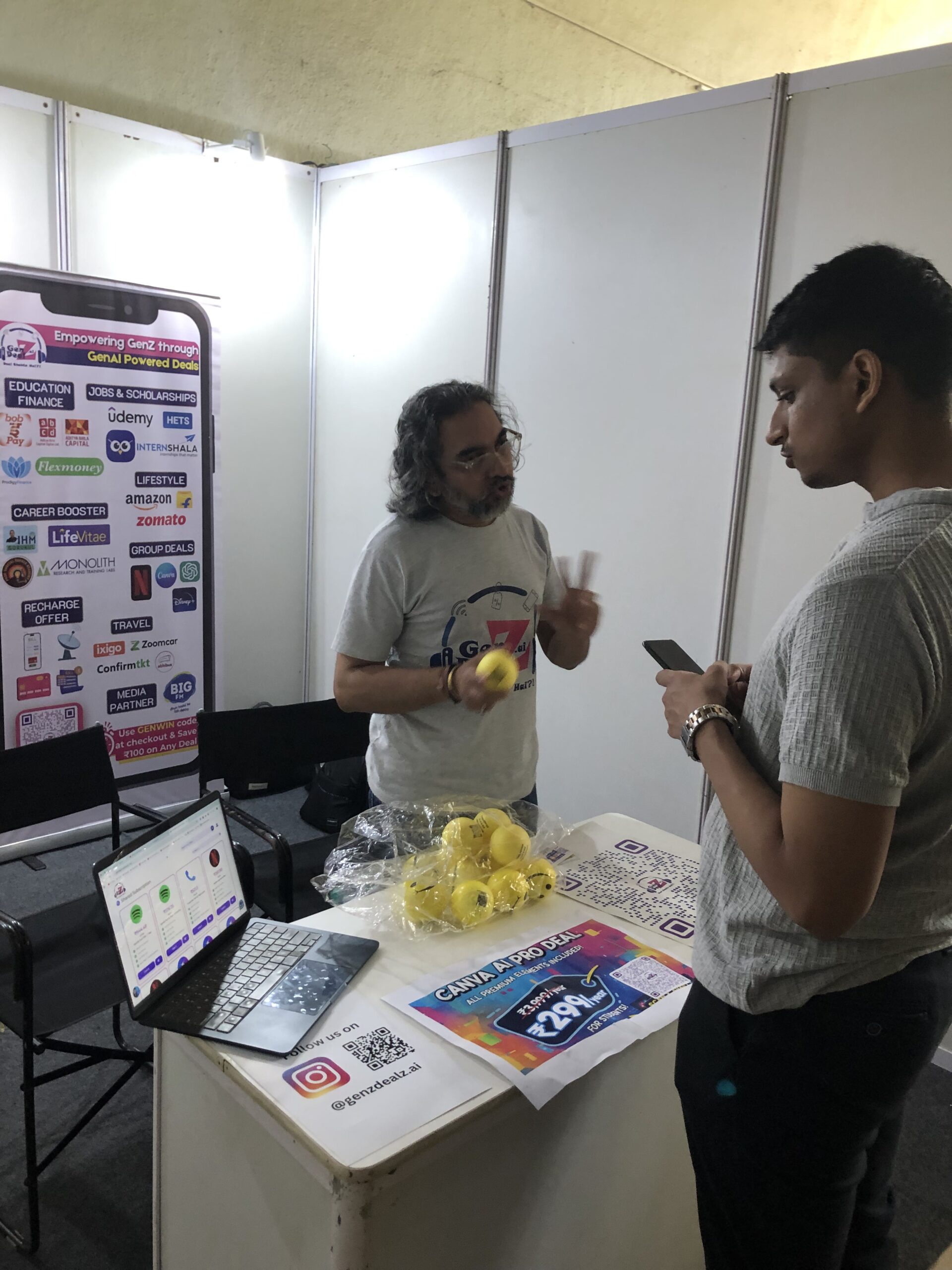
Our stall stood out by offering exclusive deals for IIT students, gifting options, and interactive engagement through the GenZDealZ App.


Pre-Event Challenges

  • Gate Pass Issues: No gate pass was ready when we arrived at 11:30 AM, which delayed setup.
  • Weather: Heavy monsoon made logistics tricky.
  • Stall Relocation: We had to shift our stall three times due to lighting and space constraints.
  • Materials: Carrying standees, banners, and marketing kits through security was a challenge.

Pro Tip for Brands:
Always confirm stall number, building name, and gate pass details in advance to avoid last-minute chaos.


https://www.instagram.com/p/DQlqYC5Amg8/

Here’s a short reel of the event

Engagement Highlights

  • Student Influencer Support: Vidit from Pillai College helped amplify our initiatives.
  • Audience Interaction:
    • IIT students showed interest not just in deals but also in understanding our backend business model.
    • School students and parents engaged with curiosity about entrepreneurship.
  • Giveaways: Distributed 200 smiley balls:
    • 70% IIT crowd
    • 10% professors and parents
    • 20% school students and general visitors

GenZDealZ.ai at IIT Powai

Operational Insights for Brand Managers

  1. Essential Materials: Carry tapes, gum, and extra lighting for banners and standees.
  2. Volunteer Support: Have at least one college volunteer to direct traffic to your stall.
  3. Peak Hours:
    • Opening time
    • Lunch hours
    • Evening (5 PM – 7 PM)
  4. Food Strategy: Pack your own meal—monsoon limits options to expensive, less nutritious food.
  5. Team Presence: Ensure your team is active during peak footfall hours.

Social Media Strategy

  • Capture high-quality photos and videos when VIPs or seniors visit.
  • Record authentic student conversations and problem statements.
  • Offer tangible gifts (smiley balls, vouchers) to create shareable moments.
  • Edit content professionally for targeted platforms.

Performance Metrics

  • Set clear goals: App downloads, website visits, or lead captures.
  • Align team efforts around these targets for measurable success.

Key Takeaways

  • Pay volunteers well—they drive engagement during peak hours.
  • If footfall drops after 5 PM, wrap up early and focus on the next event.
  • Always plan for contingencies like weather and stall changes.

Final Thoughts

Events likeSARCathon are not just about visibility—they’re about creating meaningful connections with students and alumni. For brands, the key lies in planning, adaptability, and authentic engagement

Which Laptop Works Best for Digital Marketers in 2025? (Expert Guide)

Which Laptop Works Best for Digital Marketers in 2025? (Expert Guide)


The digital marketing landscape in 2025 demands speed, power, and adaptability. With AI tools, automation workflows, and creative software becoming central to every marketer’s workflow, choosing the right laptop is more crucial than ever. Whether you’re running multi-channel campaigns, designing creatives, or managing analytics dashboards, your laptop needs to keep up.

Below is a practical guide on choosing the best laptop for digital marketers—covering beginners, professionals, accessories, repairs, and buying tips.

1. Understanding Your Role as a Digital Marketer

Before buying, assess your stage in the digital marketing journey:

  • Beginner: Focus on cost-effectiveness and durability.

  • Intermediate: Prioritize multitasking and portability.

  • Professional: Go for high performance, advanced GPU, and long battery life.


2. Best Laptops for Digital Marketing Beginners (2025)

New digital marketers can start with mid-range laptops offering stable performance and value for money.

Recommended Specs:

  • Processor: Intel i5 / AMD Ryzen 5 (minimum)

  • RAM: 16GB for smooth multitasking

  • Storage: SSD (512GB+)

  • Graphics: Dedicated GPU (NVIDIA GTX or Apple M-series GPU)

  • Battery: At least 8 hours

  • Display: Full HD (1920×1080) minimum


Brand Model Key Features Price Range (Approx.)
HP Envy 14 i5, 16GB RAM, lightweight ₹70,000 – ₹80,000
Dell Inspiron 15 Balanced power for marketing tasks ₹65,000 – ₹75,000
ASUS ZenBook 14 Great battery and portability ₹75,000 – ₹85,000
Apple MacBook Air (M2) Ideal for light design & automation ₹95,000 – ₹1,10,000


3. Best Laptops for Professional Digital Marketers (2025)

Experienced digital marketers handle AI automation, high-end design, and data-heavy work. These users should invest in high-performance laptops.

Recommended Models:

  • MacBook Pro (M3, 2025 Edition): Industry favorite for marketing pros.

    • Exceptional battery life (up to 20 hours).

    • Optimized for Adobe Suite, Final Cut Pro, and automation workflows.

    • Excellent heat management and long-term durability.

  • Dell XPS 15 (2025):

    • Ideal for video editing and analytics.

    • Sharp 4K display and robust GPU for design work.

  • ASUS ProArt StudioBook:

    • Tailored for design-heavy users and creative professionals.

    • Excellent performance-to-price ratio.


4. Getting the Most from Your Mac

When purchasing a Mac, request a Technical SPOC (Single Point of Contact) from the Apple Store.
They’ll:

  • Explain ideal configurations for your use case.

  • Offer training on optimizing performance.

  • Provide fast, reliable support if issues arise.

Once you start using macOS, you’ll experience smoother workflows, better battery optimization, and tighter software integration for tools like Canva, Figma, and HubSpot.

5. Common Accessory Mistakes to Avoid

Avoid wasting money on unnecessary add-ons.

Don’ts:

  • Don’t buy thick or heavy laptop cases. They trap heat and can damage screen sensors.

  • Don’t purchase extra mice—Apple’s trackpad or Windows Precision Touchpad is efficient enough.

Do’s:

  • Do get a screen guard, keyboard protector, and trackpad cover to prevent dust buildup.


6. Is AppleCare Worth It for Digital Marketers?

Yes. If you use your Mac 12–15 hours daily, AppleCare is a must.

Why:

  • Regular heavy use causes battery wear, haptic pad malfunction, and screen sensor degradation.

  • Apple repairs are expensive (diagnosis alone costs ₹3,000+ in India).

Tip: Opt for 2-year AppleCare+ for long-term peace of mind. The first year rarely has issues, but the second year can bring wear-related problems.

7. Student Discounts on MacBooks (2025 Update)

Students can claim up to 5%–10% discounts on Apple products through:

  • Apple Education Store

  • UNiDAYS, StudentBeans, or GenZDealZ.ai

Requirements:

  • Valid student ID

  • Fee receipt

  • Personal details

You can even use a family member’s college credentials (as long as they’re verified).

Note:
Apple won’t apply discounts if you use EMI or finance through HDFC/Bajaj.

8. Best Time to Buy a MacBook (India 2025)

Top Seasons for Discounts:

  • Festive sales: Diwali, Independence Day, or Republic Day.

  • Online clearance events: Amazon & Flipkart Apple Days.

  • Education months (June–August): Student deals and free accessories.

Pro Tip:
Combine bank offers with verified brand vouchers from platforms like GenZDealZ.ai or UNiDAYS to maximize savings.

9. MacBook Repair Costs and When to Replace

Service Cost Range (₹)
Basic Diagnosis 3,000 – 5,000
Battery Replacement 12,000 – 18,000
Trackpad/Haptic Repair 15,000 – 25,000
Screen Replacement 25,000 – 40,000


Recommendation:
If total repair costs exceed 40% of your laptop’s resale value, sell it on Cashify.in or Quikr and upgrade.
Example: The author sold an old MacBook for ₹7,100 with screen and battery damage.

10. Financing Options for Digital Marketers

If your budget is tight, you can:

  • Buy on EMI and pay with freelance or agency project earnings.

  • Improve your CIBIL score by making timely payments.

  • Choose 0% EMI plans on select cards during Apple sale events.


11. Key Takeaways

Level Recommended Laptop Price Range Priority Feature
Beginner HP Envy / Dell Inspiron ₹65K–₹80K Balanced performance
Intermediate MacBook Air M2 ₹95K–₹1.1L Lightweight, stable
Professional MacBook Pro M3 ₹1.7L+ Performance & durability


12. FAQs

1. Which is better for digital marketing — Mac or Windows?
Mac offers better design, reliability, and battery life. Windows laptops provide better customization and affordability.

2. Is 8GB RAM enough for digital marketing?
Minimum is 16GB for smooth multitasking, especially with Chrome, Canva, and automation tools.

3. Do I need a dedicated GPU as a marketer?
Yes, for video editing, design tools, and running AI automation workflows.

4. Can I run Adobe Suite smoothly on MacBook Air?
Yes, M2 and later chips handle Adobe apps efficiently for non-4K projects.

5. Should I buy refurbished MacBooks?
Only from verified Apple Refurbished Stores with warranty.

6. What are the must-have software tools for digital marketers?
Google Analytics, Canva, Notion, ChatGPT, Mailchimp, and Adobe Creative Suite.

Conclusion

Choosing the right laptop in 2025 depends on your professional level and workload intensity.
Beginners can start with solid mid-range devices, while advanced marketers will find the MacBook Pro M3 unmatched in performance, reliability, and ecosystem integration. Always factor in long-term costs like repairs, AppleCare, and accessories.

Invest once, optimize forever.


Is WhatsApp Status Boost Real? How Our Ad Became Top Performing?

Is WhatsApp Status Boost Real? How Our Ad Became Top Performing?

In today’s hyper-connected world, WhatsApp has evolved beyond a simple messaging platform. With over 2 billion active users, it’s now a powerful marketing tool for brands and campuses seeking direct engagement with their audiences. One underrated yet highly effective feature is WhatsApp Status Boost—a feature that delivers real, measurable results.

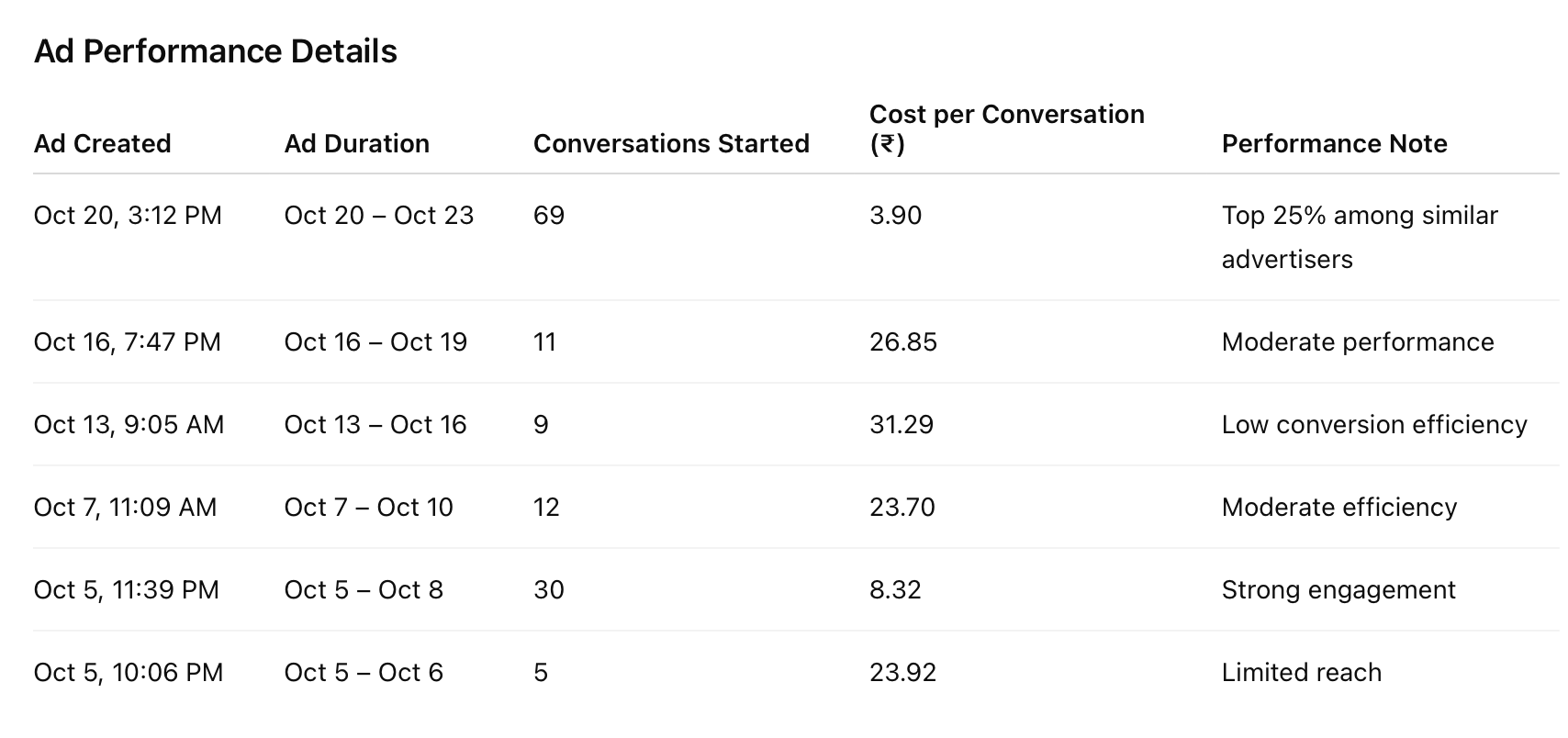
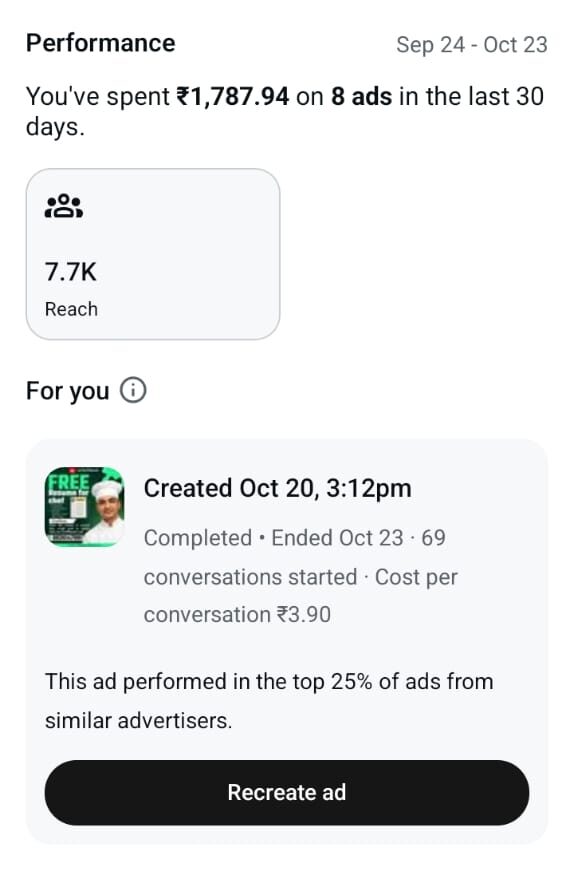
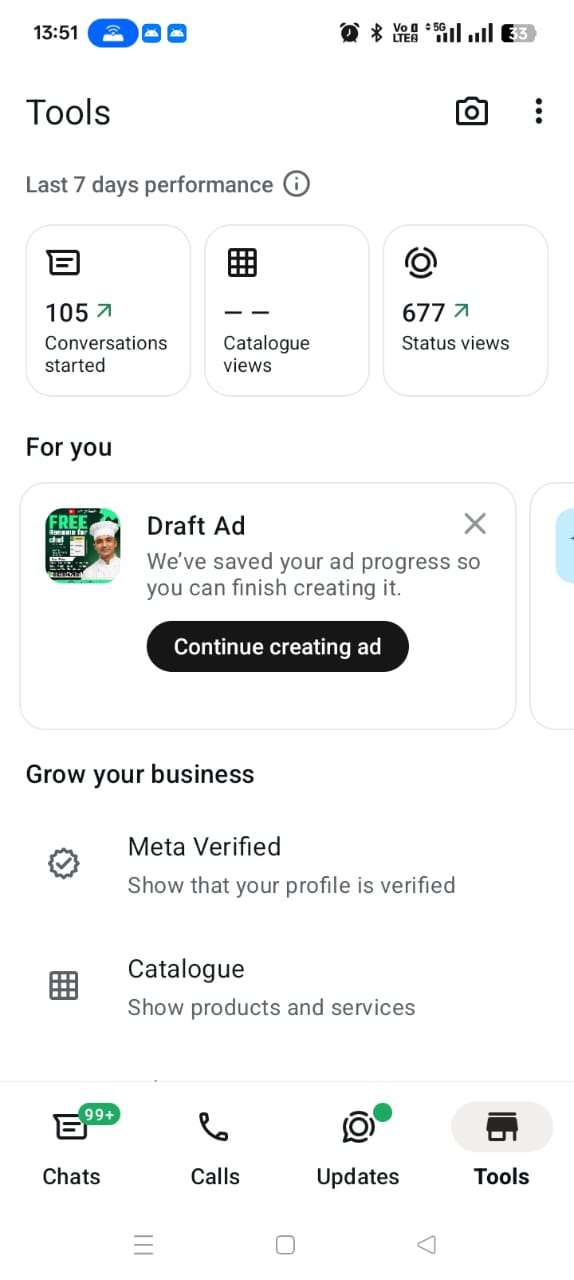
WhatsApp Boost report at IHM Gurukul

Recently, Chef Dheeraj Bhandari, founder of Billionaire Chef Media Pvt. Ltd., tested this strategy while promoting hospitality career services under the IHM Gurukul brand. The results were remarkable, proving that WhatsApp Status Boost isn’t just a feature—it’s a conversion engine.

WhatsApp Boost report at IHM Gurukul

WhatsApp Boost report at IHM Gurukul


Case Study: IHM Gurukul x Billionaire Chef Media

When we set out to test the WhatsApp Status Boost feature, the goal was simple: increase awareness, drive engagement, and generate real inquiries. Partnering with Chef Dheeraj Bhandari, we implemented this feature to promote multiple offerings.

Services Promoted:

  1. Resume & Cover Letter Services – Specializing in international resumes and customized cover letters tailored for chefs and hospitality professionals.
  2. ChefDhundo.com Launch – A platform built to host the largest collection of chef resumes worldwide. Chefs could easily submit resumes and connect with employers.
  3. Hospitality Ebooks & Programs – Targeted campaigns to promote educational content and training opportunities for hospitality aspirants.

Each of these promotions leveraged WhatsApp Status Boost to reach the right audience with minimal effort.

WhatsApp Boost report at IHM Gurukul

How We Discovered the WhatsApp Status Boost Feature

Initially, the WhatsApp Boost option appeared similar to traditional Meta Ads, but upon closer testing, we realized its potential is far greater. Unlike standard ads that run across Facebook or Instagram, WhatsApp’s boosted status is personalized and high-touch.

Here’s what happens when you use WhatsApp Status Boost:

  • Your boosted story appears on Facebook Stories, Instagram Stories, and WhatsApp Status simultaneously.
  • Interested users can message you directly on WhatsApp, providing verified contact numbers.
  • Once users interact or save your contact, they continue seeing your future WhatsApp updates—creating an ongoing remarketing loop.

This combination of personalization and persistence creates a relationship-based marketing funnel, rather than a one-time impression.

Real Results: What We Achieved

To maximize engagement, we took a bold step: we made our resume and cover letter services completely free of costfor the initial phase. The goal was to attract both candidates and employers and build momentum for ChefDhundo.com.

Outcomes:

  • A significant spike in resume submissions on ChefDhundo.com
  • Direct inquiries from hospitality business owners seeking staff
  • Increased visibility for Chef Dheeraj’s video content and short-form media
  • Stronger remarketing opportunities through future WhatsApp broadcasts

The trust factor played a crucial role here. With Chef Dheeraj’s established presence and daily video content, the audience was already familiar with the brand, making engagement frictionless.

Why WhatsApp Status Boost Works for Brand & Campus Engagement

  1. Direct Audience Access – Messages land straight into users’ WhatsApp inboxes, not just social feeds.
  2. Verified Contacts – Every response comes from a real WhatsApp-registered number.
  3. Cost-Effective Reach – Lower spend compared to traditional Meta Ads while maintaining high relevance.
  4. Remarketing Made Easy – Once users save your contact, they remain connected for future promotions.
  5. Cross-Platform Visibility – Simultaneous display across WhatsApp, Facebook, and Instagram.

For campus engagement, especially in education or hospitality sectors, this approach ensures your message doesn’t get lost in digital noise. It builds genuine relationships with students, alumni, and industry professionals.

Strategic Insights from the Experiment

  • Offer Value First: Providing free or high-value services initially builds trust and accelerates visibility.
  • Leverage Existing Content: If your brand already produces video content, tie it into your boosted status campaigns for stronger recall.
  • Optimize for Retention: Encourage users to save your contact for future updates and offers.
  • Analyze & Iterate: Monitor metrics such as link clicks, direct messages, and conversion rates to refine your next campaign.

The Bigger Picture: Future of WhatsApp Marketing

The WhatsApp Status Boost feature has opened new doors for direct marketing. As brands and campuses look for authentic ways to connect, WhatsApp offers a rare combination of reach, intimacy, and continuity.

For educational institutions like IHM Gurukul, or for career platforms such as ChefDhundo.com, this means creating engagement that doesn’t feel like advertising—it feels like a conversation.

FAQs

Q1: What is WhatsApp Status Boost?
It’s a Meta-integrated ad feature allowing brands to promote their WhatsApp status across Facebook, Instagram, and WhatsApp simultaneously.

Q2: Is WhatsApp Status Boost different from Meta Ads?
Yes. It’s more personalized. Messages lead directly to your WhatsApp chat, allowing instant communication with verified users.

Q3: Can small brands or campuses use this feature?
Absolutely. It’s affordable and scalable, making it ideal for startups, institutions, and local brands.

Q4: What kind of content works best?
Short, visually appealing videos or clear call-to-action graphics perform best.

Q5: Is remarketing possible through WhatsApp?
Yes. Once users save your contact, you can re-engage them via status updates or broadcast messages.

Q6: How can campuses use this for student outreach?
They can promote admissions, webinars, and placement drives directly through personalized WhatsApp messages.

Conclusion

The WhatsApp Status Boost feature isn’t a myth—it’s a measurable, proven marketing tool. For brands and campuses seeking genuine engagement, it bridges the gap between digital advertising and human connection.

The success story of IHM Gurukul, Chef Dheeraj Bhandari, and ChefDhundo.com is proof that with the right strategy, WhatsApp can be your most powerful growth channel.

📢 Next Steps:

  • Try your own WhatsApp Status Boost campaign.
  • Visit ChefDhundo.com to explore opportunities.